Announcing Casual HTML & CSS
06 Jan 2026 Charles Choi
Although I rarely code up HTML and CSS these days, knowing their basics have brought me compounding rewards time and time again. If you use Emacs, you’re in luck as it provides built-in editing modes for both. These modes can make short work of sculpting your web pages to be presentable to the world at large.
Improving the discoverability of the features in these modes is what the latest v2.12.0 update of Casual is all about. Announcing Casual menus for HTML and CSS, new for 2026, now available on MELPA.
Casual HTML
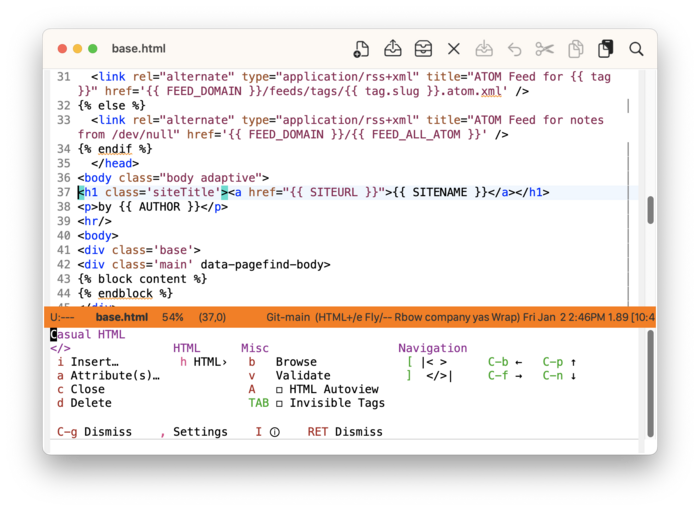
The main menu for HTML mode is shown below. Tag (</>) operations for inserting, adding an attribute, closing, and deleting are supported.
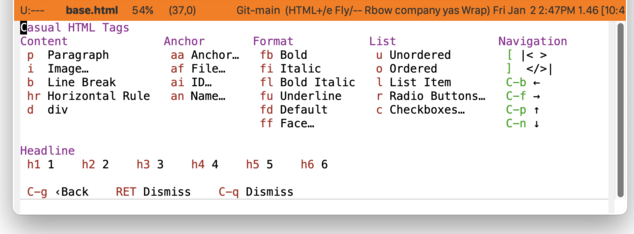
HTML-specific tags are given their own menu.
Casual CSS
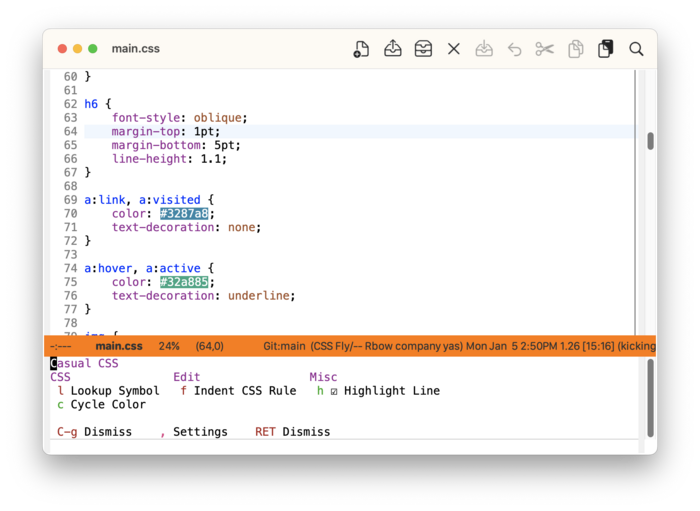
The main menu for CSS mode is shown below. A notable feature is the ability to lookup a CSS symbol from the Mozilla Developer Network (MDN) website using the built-in Emacs browser EWW.
Closing Thoughts
Both HTML and CSS modes support Tree-sitter which offers nice structural navigation features. Although at the time of this writing (Emacs 30.2), using html-ts-mode will break tag deletion (sgml-tag-delete). On the other hand, I use css-ts-mode without issue.
If you haven't used either HTML or CSS modes yet, definitely give them a try using my Casual menus. I think you'll find them to be quite usable.