In Emacs, Everything Looks Like a Service
09 Jul 2026 Charles Choi
A common refrain is that Emacs is an operating system (OS). This isn’t true, but what invites comparison to an OS is its ability to orchestrate applications and utilities above the OS kernel level. The diagram below suggests a truer picture of how Emacs’ relates to an OS and its capabilities.
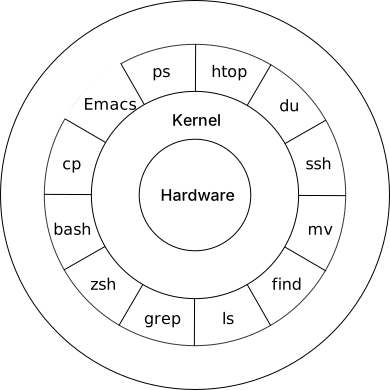
Emacs’ built-in access to OS system services (file system, network, etc.) coupled with the ability to run other programs makes it routine to improvise client behavior within it. Because of this, Emacs users are able to accomplish many of their computing needs from the different client modes that have been made for it. This gives credence to the notion of “living only in Emacs.”
In this post, we’ll examine some of the ways Emacs lets you build a client. By the end of this post, you’ll hopefully be convinced that from within Emacs, everything looks like a service.
Client-Server Model
Let’s first provide some definitions.
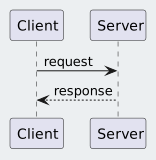
The Client–Server model is a common computer interaction pattern where a task is partitioned between the provider of a resource (the service) and the requester of that resource (the client). The client issues a request to the server, and the server in turn returns a response as shown in the diagram below.
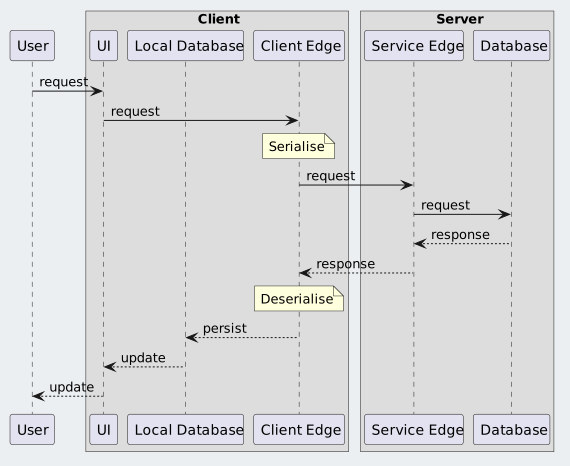
Depending on the implementation, the transaction (request + response) can occur over a network or be local to a system. Client-server models using a network has been most elaborated upon with REST-style software architectures. Shown in the sequence diagram below is a common implementation pattern for REST-style client server architecture.
Emacs as a Client
From the diagram above, there are three concerns the client is typically responsible for:
- UI: User interface (if any).
- Client Edge: Sub-system concerned with communication with the service. For networked clients, this is the network sub-system.
- Local Database: Representation of data that is exchanged or synchronized with the server. How this data is managed is up to the implementation requirements.
For the above concerns, Emacs provides numerous libraries both built-in and third-party which can implement a client. Listed below are some built-in libraries with their respective links for further reading:
-
UI
-
Client Edge
- URL
- Socket (TCP/UDP)
- SMTP
- Serialization/Deserialization
-
Local Database
- Collections
- SQLite
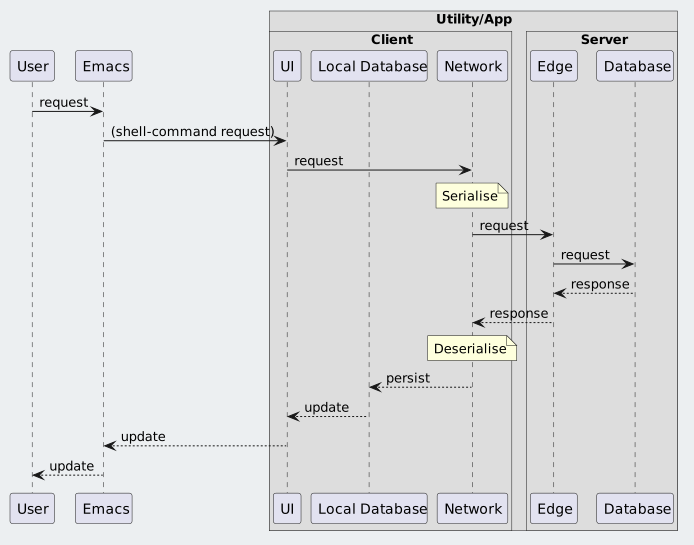
Requirements dictate the amount of complexity required to implement the Emacs client. If there is an existing command line utility that can do the “heavy lifting”, said utility can be reframed as a “service” that can be accessed via a shell call.
Elisp
All the libraries mentioned above are accessed through the Emacs Lisp (Elisp) programming language. Elisp is a dynamic programming language which allows for a high degree of improvisation during run-time. This capability allows for complex orchestration of any behavior that is available to Emacs, from Elisp functions to shell commands.
Example wttr.in client
wttr.in is a console-oriented weather forecast web-service. It supports JSON output so we can build an Emacs wttr command which will prompt for a location, make the HTTP request, process the JSON response and display the result in the mini-buffer.
The top-level command wttr is shown below.
1 2 3 4 5 6 7 8 9 10 11 12 13 14 | |
The wttr.in URL is constructed by the function wttr--request-url shown below.
1 2 3 4 5 6 7 | |
We can subsequently pass that URL into fetch-json-as-hash-table which does the heavy lifting of retrieving the URL and parsing the JSON response into an Elisp hash-table.
1 2 3 4 5 6 7 8 9 10 11 12 13 | |
Finally we can extract the desired values from the JSON response (jsondb) to populate the message that will sent to the mini-buffer.
1 2 3 4 5 6 7 8 9 10 11 12 13 14 15 16 17 18 19 20 21 22 23 24 25 26 27 28 29 30 | |
Closing Thoughts
At this point, hopefully you are convinced of the title assertion that from Emacs, everything looks like a service. Furthermore, many of the APIs offered by Emacs work at a high-level of abstraction. Consider that the lines of code for wttr.el weighs in at 67. (Result using the cloc utility.)
If that’s too much, then imagine an alternate implementation where the actual network request and JSON processing is done in a Python script called weather. Then the Elisp command to invoke it is just the code shown below.
1 2 3 4 5 6 7 8 9 | |
With the above implementation, the shell command becomes effectively the “service” to make a request to.
As Elisp is a dynamic programming language, it can allow for integration of Elisp libraries with command line utilities in an improvised fashion.
This capability is compelling to users who recognize the opportunities it can offer.