Using Casual to work with Emacs Registers, Rectangles, and Windows
07 Feb 2026 Charles Choi
The features of registers, rectangles, and window management in Emacs are quite powerful yet prior to building Casual, I rarely used them because of the cognitive load of remembering each feature’s command sets, much less their bindings. Using keyboard-driven menus tailored for these three features changed that. Now I only have to recall three key bindings to get easy access to registers, rectangles, and window management. This post demonstrates how you can as well.
Provided you have Casual installed from MELPA, consider making the following global key bindings to your Emacs setup:
1 2 3 | |
As always, you can adjust these bindings to your preference.
Each of these menus are detailed further below.
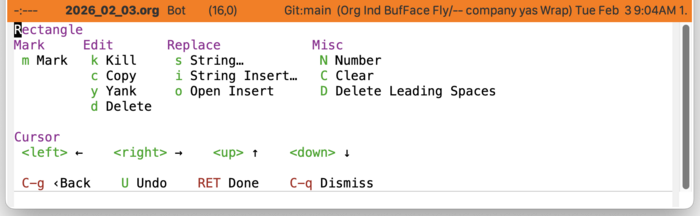
Rectangle Menu (casual-editkit-rectangle-tmenu)
The rectangle feature gives you the ability to mark (select) an arbitrary rectangle region in an Emacs buffer. There are many times where if the text is shaped like a rectangle, making transformations on them is exceptionally convenient. This menu provides you this.
Registers Menu (casual-editkit-registers-tmenu)
Registers provide users a way to temporarily keep track of Emacs run-time state like text clippings, cursor (point) positions, macros, and arrangement of windows.
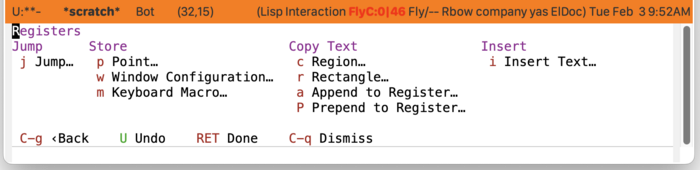
Registers are a distinguishing feature of Emacs from other applications that support writing. It’s definitely a feature I miss when working outside of Emacs.
Windows Menu (casual-editkit-windows-tmenu)
In Emacs vernacular, a window is a visual organization of how a buffer is displayed. Emacs windows are not the same as what conventional GUIs (e.g. Wayland/X11, Apple macOS, Microsoft Windows) refer to as windows. In Emacs, GUI windows are referred to as frames.
Emacs provides a number of commands to manage windows throughout their entire life-cycle which Casual organizes into the menu shown below:
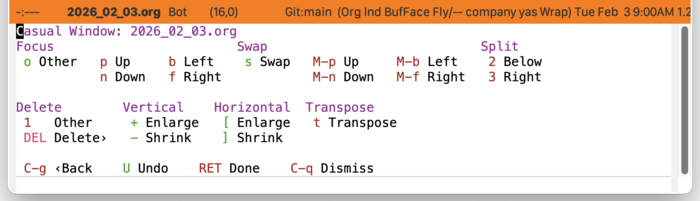
In practice, I’ve found this menu to be most useful when using a compact/laptop-style keyboard or accessing Emacs via TTY. But if you are using GUI Emacs with a keyboard that has a number-pad, consider making the following number-pad bindings, particularly for selecting focus and swapping windows.
1 2 3 4 5 6 7 8 9 10 11 12 13 14 15 16 17 18 19 20 21 22 23 24 25 | |
Note that the bindings for ace-select-window and transpose-frame require that you have the ace-window and transpose-frame packages installed.
Closing Thoughts
Registers, rectangles, and managing windows in Emacs are powerful features that are made easier to use with Casual. If you haven’t explored them, consider trying them out. I think you’ll be pleasantly surprised by what they offer and over time will consider them essential to your Emacs experience.