Announcing shazam.el
24 Aug 2026 Charles Choi
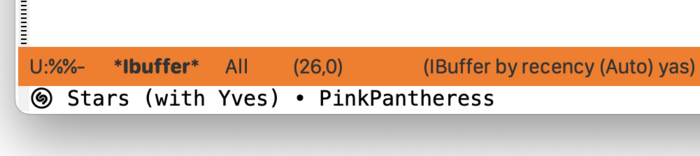
Continuing my explorations on malleable computing with Emacs is examining access to OS/Platform-specific resources, in this case with macOS. macOS provides a number of mechanisms for high-level inter-process communication, among them AppleScript & Automator Actions (now considered legacy but still maintained) and App Intents, Entities & Shortcuts (introduced in macOS 13 and considered by Apple a replacement for the former).
This post both announces and covers the implementation of an Emacs integration with the Shazam music recognition service that is packaged with macOS. This Emacs integration is called shazam.el (https://github.com/kickingvegas/shazam) and is now available for installation via MELPA.
To understand the shazam.el implementation, the following background information is provided.
Background
Shazam is a music recognition service that is implemented across Apple's different platforms (macOS, iOS/iPadOS, watchOS, tvOS). This service provides a shortcut action (Recognize Music) which is implemented using the following APIs:
-
App Intent: An expression of an app’s capabilities to the system (in this case the ecosystem of Cocoa-based applications), and contains code to perform that action (App intents | Apple Developer Documentation).
-
App Entity: Information provided to the system about your app’s data, or about concepts related to your app’s data (App entities | Apple Developer Documentation).
-
App Shortcut: A workflow (including UI) for orchestrating App Intents and Entities (App Shortcuts | Apple Developer Documentation). There are a number of ways to access a Shortcut, among them via the Shortcuts app or Siri.
With the Recognize Music shortcut action we can realize the Elisp package shazam.el.
Implementation
A Shortcut (aka workflow) defined in the Shortcuts app can be invoked via command line as follows:
1 | |
where “shortcut name” is the name given to a Shortcut enclosed by double-quotes.
If the Shortcut is intended to write to stdout, then the shortcuts command line utility must be run into a pipe.
1 | |
The above incantation lets Emacs run a Shortcut.
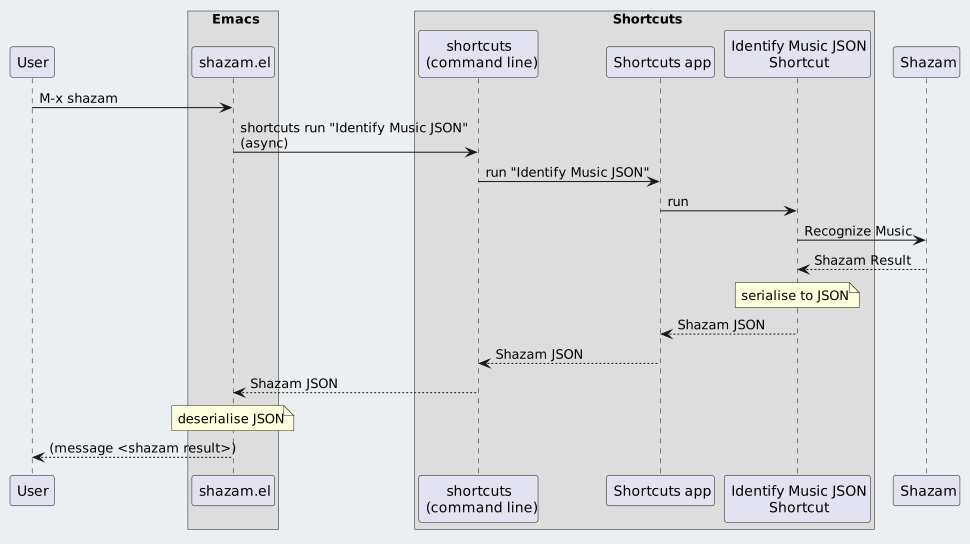
The Shortcut used by shazam.el invokes the Recognize Music action and does some work to transform the Shazam search result into a JSON dictionary. The JSON dictionary is written to stdout (iCloud Shortcut: “Identify Music JSON”) which can be read by Emacs and processed.
The sequence diagram below shows the overall integration workflow between Emacs and Shortcuts for shazam.el.
Features
Details on all the features provided by shazam.el can be found in its User Guide. Of note is that once the Shazam search result is deserialized, its content can be processed into a variety of formats. shazam.el takes advantage of this by storing recognized search results into an Org file, using Org markup and properties to store metadata provided by each result. Users can subsequently peruse this history file at their convenience.
Closing Thoughts
This work builds off the explorations in malleable computing with Emacs described in my prior posts:
- nfdn: In Emacs, Everything Looks Like a Service
- nfdn: Malleable Computing, Emacs, and You
- nfdn: Announcing now-playing.el, an Emacs interface for the macOS Music app
There is not a lot of Elisp to shazam.el as shown in the cloc result for it:
1 2 3 4 5 6 | |
Most of the challenge in building shazam.el was understanding how start-process worked to asynchronously run the shortcuts command line utility.
A downside to using a Shortcut (workflow) is the requirement to use a binary code-signed representation that is accessed via the Shortcuts app. This makes it less flexible than AppleScript where declaring behavior can be done in plain text. For example, the now-playing.el package can remote-control the Music app via AppleScript that is directly invoked from Emacs built with support for ns-do-applescript. In contrast, accessing contemporary macOS app behavior that is exposed via Intents and Entities requires installing (or creating) a binary code-signed representation (the Shortcut). This adds an extra step (or steps for installing multiple shortcuts) to build an integration with Emacs or any other orchestration tool.