Opening macOS Finder Folders in Emacs with Scrim
01 Jun 2026 Charles Choi
TL;DR
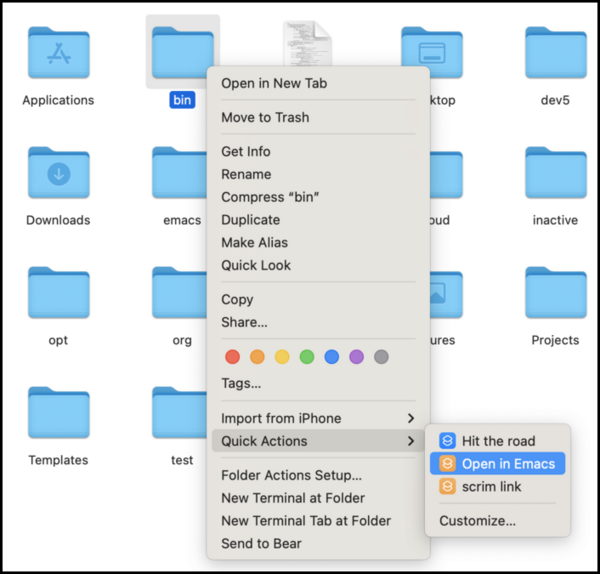
If you use both Scrim and Emacs on macOS, you can “Open in Emacs” a file or directory from Finder via the “Quick Actions” context menu. This is implemented as a macOS Shortcut, shared as an iCloud link:
“Open in Emacs” Shortcut iCloud Link
Motivation
I find macOS drag-and-drop operations from Finder to Emacs (in particular, the NS variant) to be frustratingly inconsistent.
- Dragging a file or folder from Finder to a non-Dired buffer will visit it.
- Not always! This behavior can be mode-specific.
- Dragging a file or folder from Finder to a Dired buffer will copy it.
- Dragging a file or folder from Finder to the Emacs icon in the Dock will visit it in a new frame.
Add to that, drag-and-drop isn’t graceful with a long traversal path on a large screen.
Ultimately, what I want is a single consistent action to “Open in Emacs” a file or directory from Finder. This post describes a solution for achieving this using the Scrim and macOS Shortcuts apps.
Background
Scrim
Scrim is an Org protocol proxy app that I had published on the App Store last year. Implementing Scrim was largely an exercise in reverse-engineering emacsclient to be a macOS app. This is because macOS apps these days (macOS 10.14+) are packaged to execute as a hardened runtime (aka “sandboxed”). Among the many things a hardened runtime restricts is the ability for an app to exec another program outside of its sandbox (like emacsclient).
In lieu of that restriction, macOS provides different APIs to let apps work with other apps, among them Services (more below), Intents (a whole different topic worthy of another post), and custom URL schemes.
A custom URL scheme is what Scrim provides to allow other apps to do emacsclient-like things like opening a file. By design, Scrim does not surface all the capabilities of emacsclient such as arbitrary Elisp execution. The custom URL scheme itself is scrim://.
Currently the scrim:// URL scheme supports the following two actions:
- Visit a file or directory (e.g.
scrim://open?file=~/.profile) - Open an Info node (e.g.
scrim://info?node=(eshell) Top)
For this post, we will concern ourselves with (1) visiting (opening) a file or directory.
Note that on a system where a custom URL scheme is installed, any app on that system can open said custom URL scheme.
Services
The macOS Services API allows an application to access the functionality of another.
Apple uses this API to provide tools to help orchestrate workflows between different applications, namely AppleScript, Automator, and Shortcuts. Note that as of this writing, AppleScript and Automator are in maintenance mode, and Shortcuts is intended to supersede Automator. Once a workflow is defined, it is usually accessed via a context menu sub-menu labeled “Quick Actions” or “Services”.
“Open in Emacs” Shortcut
With the above background out of the way, let's turn our attention to the Shortcut itself.
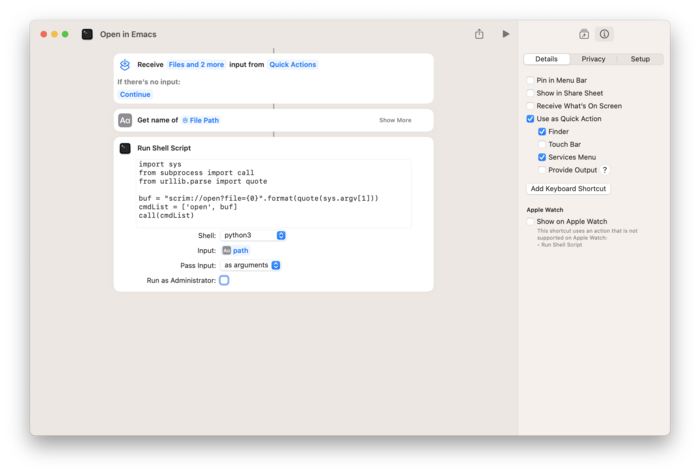
The shortcut invokes a Python script which forms the scrim://open?file custom URL and then opens it with the open command line utility.
1 2 3 4 5 6 7 | |
This shortcut can be installed via iCloud link: “Open in Emacs” Shortcut iCloud Link.
When installed, the menu item "Open in Emacs" will appear in the "Quick Actions" sub-menu when the context menu is raised on an Finder item.
“scrim link” Shortcut
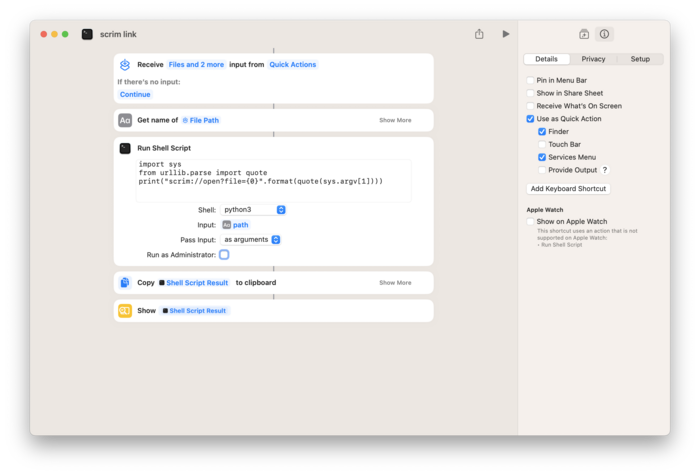
What if you want just the Scrim URL to open a file or directory instead? The shortcut "scrim link" shown above provides that, putting the URL into the system clipboard to paste into another native macOS app like Notes or TextEdit. Such apps that recognize custom URL schemes will treat the URL as a “live” link.
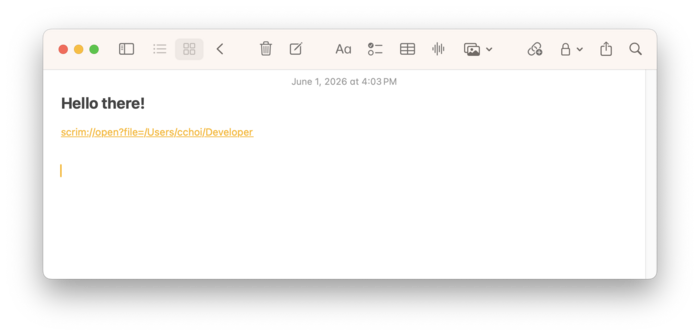
This shortcut is available at “scrim link” Shortcut iCloud Link.
Closing Thoughts
While the behavior of "Open in Emacs" seems modest, a lot of things need to happen under the hood to orchestrate the different apps required to make it happen on macOS. But taking a step back, I'd observe that this is not unique to just macOS alone. Other contemporary operating systems are following suit as seen with Snap (Ubuntu) and Flatpak for Linux, and UWP for Windows. Such isolating practices by OS vendors are not going away.
Running counter to this is the spate of interest in orchestrating apps and/or services together using AI tools, whose approach so far is to bypass all hardened runtime boundaries.
Then there is comparison to the Emacs ecosystem, where orchestration of apps (or rather modes) is routinely done via Elisp. By implementation circumstance there are effectively no concerns for security boundaries within the internals of Emacs.
There's a lot of ground to ruminate on, in particular software malleability and orchestration, which I intend to do with future posts on this blog.