Revisiting Emacs Keyboard Macros with a Mouse
04 Jun 2026 Charles Choi
“No-code automation” has been in Emacs far longer than its usage as a term of art. Better known as keyboard macros, this feature has allowed Emacs users to achieve their bespoke needs for decades, all without needing to know a whit about Lisp. I can testify to this personally: though I’ve been using Emacs since the early 90’s, only in the past three years has writing Elisp played any part in it. For most of my Emacs journey, I got by with just making keyboard macros.
If you’re unfamiliar with them, here are two links you should get to know:
- The official Emacs manual for keyboard macros ((emacs) Keyboard Macros)
- Mickey Petersen’s post - “Keyboard Macros are Misunderstood”
My addition to the knowledge of those posts is to boost this fact: mouse events can also be captured by a keyboard macro. If you know where a command is in a menu, you can also record clicking on it. I think the ability to combine both keyboard and mouse events in a keyboard macro is compelling, so much so that I decided to emphasize this in Anju.
The recent Anju v1.5.0 release added the menu “Tools › Macro Recorder” to the menu bar as shown below.
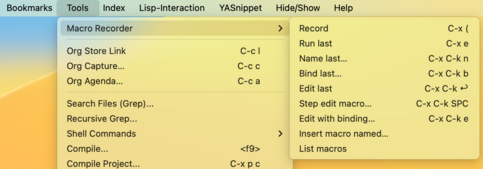
With this, mouse enthusiasts can create and run keyboard macros without need to recall keybindings or deal with inconsistent command naming, as observed in Petersen’s post.
One thing that I TILed about keyboard macros in building this menu was the command list-keyboard-macros (see (emacs) Kmacro menu). This command is available in the “Macro Recorder” menu as the item “List macros”. This lets you manage multiple keyboard macros that have been defined during a session.
If this interests you, I invite you install Anju from MELPA and give it a try. Let me know what you think!