Using the Mouse for Emacs Rectangle Commands
18 May 2026 Charles Choi
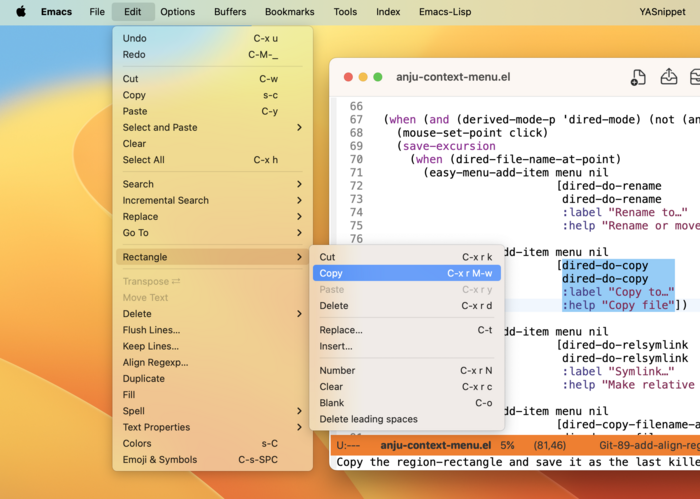
Of all the built-in editing commands in Emacs, the commands that work with rectangles delight me the most. Once understood, they can save effort in many situations.
That said, the biggest downside to rectangles is the amount of setup it takes to use them. As with many things Emacs, by default you have to memorize a bunch of keybindings to get anything done with them.
In Casual, I addressed the above downside by providing a Transient menu for rectangle commands. Since building that, I've come to use rectangle commands routinely. But even then, there is ceremony to set up a rectangle selection.
With my recent work on mouse-driven interactions in Anju, I’ve learned that rectangle selection is trivial via C-M-<mouse-1> dragging. Once selected, having a menu of rectangle commands makes working with them even easier. So I made one for the latest v1.4.0 update for Anju, now on MELPA.
The “Rectangle” sub-menu is available via the main menu bar “Edit” menu (as shown in the screenshot above) or via context menu. Using rectangle commands in conjunction with the align-regexp (“Edit › Align Regexp…”) and whitespace-cleanup (“Edit › Delete › Whitespace Cleanup”) can make short work of editing text that is laid out in columns. Anju makes both of these commands available from the main menu.
Side note: on using C-M-<mouse-1>, sometimes Emacs will only read M-<mouse-1> and do a secondary selection, leaving an unwanted highlight. Enter M-<mouse-1> to dismiss the highlight.
If you find Anju to be useful, please support its development by buying me a coffee. I’ve got a number of new features planned for it.