Enhancing Elisp Development with Context Menus
11 May 2026 Charles Choi
As celebrated as Emacs is for its programmability, I find the actual process of developing Emacs Lisp (Elisp) to be quite underwhelming. Developing in Elisp has meant learning its libraries and idioms, which is to be expected. What I really don’t care for though are the arcane keybindings associated with doing basic things like evaluating, navigating (Xref), and debugging (especially debugging). While I’ve already committed to muscle memory most of said keybindings, I’d argue that having a mouse-based “point and click” interface is beneficial for both novice and experienced Elisp developers alike, as it lets one focus on the code and not on recalling the right key incantation all the time.
The addition of context-menu-mode in Emacs 28 has provided the opportunity to build a mouse-based UI for Elisp development and I’m happy to announce the availability of one in the latest v1.3.0 update to Anju, now on MELPA.
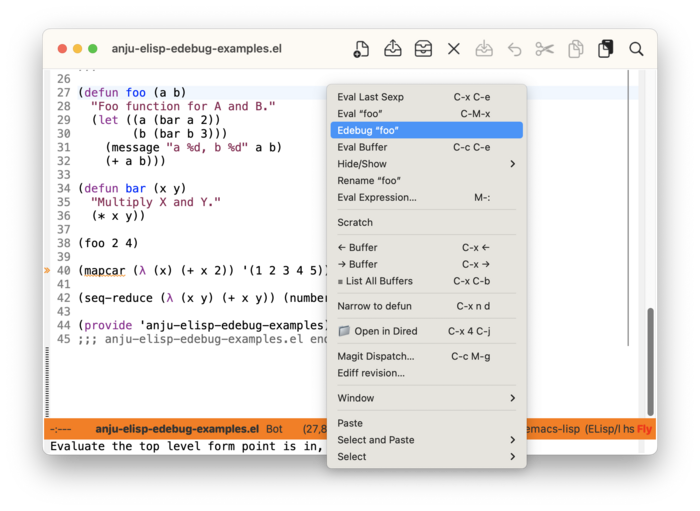
To get an idea of what’s available in the v1.3.0 update, here’s a screenshot of the context menu when normally editing an Elisp file where the point is on the symbol foo.
If foo is instrumented for debugging and run, the context menu is adjusted to provide Edebug commands as shown below.
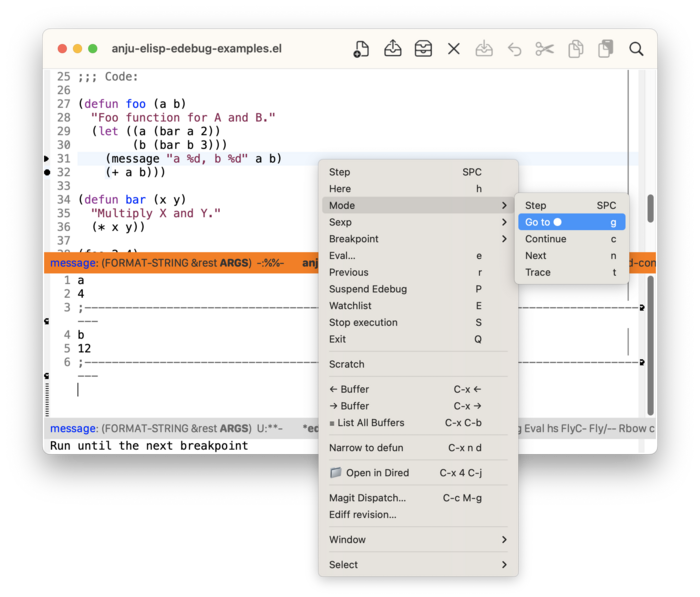
The context menu enhancements provided by Anju take full advantage of built-in functions that identify context at point. Is the point on a symbol? In a function? In an ERT test? On a lambda? The menu items added by Anju take these factors into account to provide a relevant menu offering.
Users can read more about Anju’s context menu enhancements for Elisp development at Emacs Lisp Context Menu (Anju User Guide).
Some backstory with Edebug
Back in 2024, I did a deep dive into Edebug so as to give a presentation on it at the EmacsSF meetup. In doing so, I realized that all the core features for having an Elisp IDE were there, but no good UI to present it. I set upon prototyping one using Transient, with decidedly mixed results due to both Edebug and Transient fighting each other over window management.
A later Edebug UI prototype using the toolbar was attempted but it also had its issues, particularly with layout (or lack thereof) and toolbar-specific bugs in macOS. But a benefit of using the toolbar was that its UI interactions did not interfere with window management. The context menu also shares this benefit.
Closing Thoughts
The context menu has markedly improved my developer experience with Elisp, as I find myself using it more than typing out keybindings. Even with keybindings, I’ll use the Casual Elisp Transient to accomplish most Elisp interactions that don’t require Edebug.
That said, I’m not here to eschew keybindings. I still use them, when convenient. But in many circumstances they are not. The context menu can provide an easier way to achieve the same thing. Isn’t that a good thing?